A welcoming 2D and 3D game-making workspace built toward Rust and Bevy: scene tools, reusable objects, intuitive Lua scripting, classic CSG level editing, native code, and a Fusion-style event table. Start small. Build a world of your own.
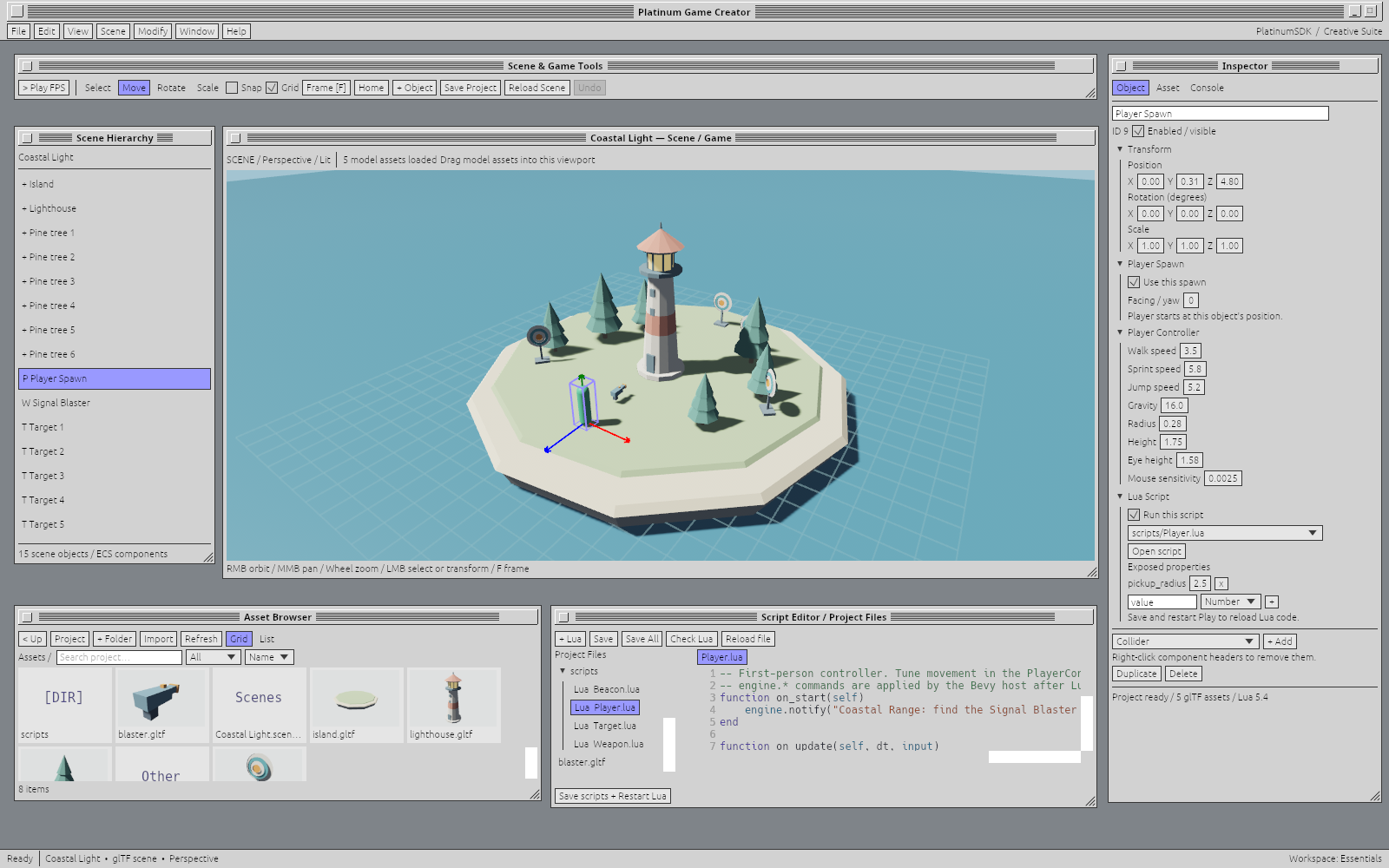
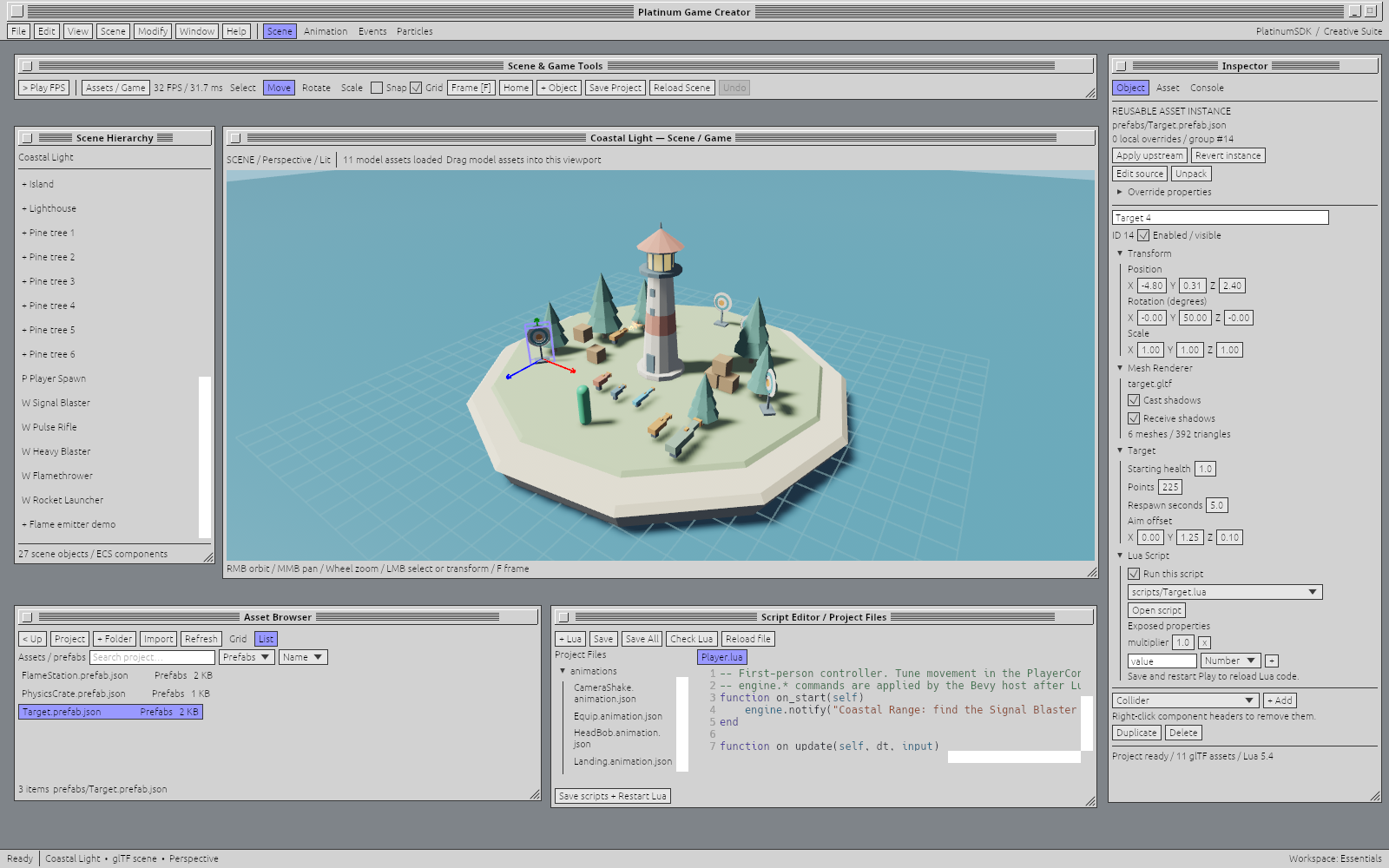
The working 3D editor: a playable island scene, glTF assets, lighting and shadows, scene components and Lua in one workspace. Open image at full size ↗
PLAY IN YOUR BROWSER
Welcome to Coastal Light.
A little island. A lighthouse. A target range to make your own. Play the standalone FPS built with Platinum Game Creator and try its movement, weapons, physics and effects for yourself.
Try the newer native demo with authored menus, spatial sound, skeletal characters and shared multiplayer gameplay. The ZIP includes the standalone game and its project assets.
Extract the ZIP and run CoastalRange.exe, keeping the assets folder beside it. Play solo or join a configured multiplayer server from the game menu. Server setup is separate from this player download.
Windows 64-bit · Native build The browser demo above remains available.
E pick up · 1–9 switch weapons · Left mouse fire · Esc pause and release the mouse
Choose Start or Resume in the game, then click the view to capture the mouse. If your browser declines mouse capture, drag to look; right-drag avoids firing. Use a desktop browser with WebGPU enabled. A full-window tab gives the game more room.
BEVY + PLATINUM GAME CREATOR
The Bevy ecosystem. A friendlier way in.
Start with the strength of Bevy’s Rust ecosystem: code, assets, tutorials, plugins and reusable systems. Add an approachable editor, intuitive Lua and event-table visual scripting. Platinum Game Creator brings those pieces into one creative workflow, so your first game can start simply and an ambitious project has room to grow.
1
Start making, straight away
Place objects, edit properties and press Play. Describe an interaction in readable Lua or build it in the visual event table. Visible tools and a short edit–play loop help a first-time creator connect an idea to something happening on screen.
2
Bring the ecosystem with you
Use compatible Bevy plugins, Rust code and systems alongside your own assets. Keep learning from the Bevy community’s tutorials and examples. Experienced developers can extend the Rust and ECS foundation directly, while giving the rest of the team a visual workspace for authoring the game.
3
Give your project a head start
First-class procedural animation, GPU particle simulation and built-in Jolt physics put movement, effects and physical interactions close to the creative work. Character Studio adds skeletal clips, graphs, blendspaces and IK to Bevy’s animation foundation. Authoritative netcode, local prediction and remote interpolation connect the gameplay across players. Mix editor authoring, Lua, visual rules and native systems around the needs of your project.
What will you make?
Build your first 2D game, a tightly focused FPS, a simulation or a larger 3D world. Keep the approachable authoring tools as you grow into deeper systems. The same scene objects, components and events connect what a designer edits to what a programmer extends.
Play Coastal Light in the browser or download the newer Windows demo with multiplayer, authored UI, sound and skeletal characters. Further platform exports continue to develop, with platform requirements and certification applying to each target.
Part of your creative toolkit.
Your project can also become part of the Platinum creative suite: shared assets, objects and scenes connect the game-making workflow to animation and video. Explore that direction below.
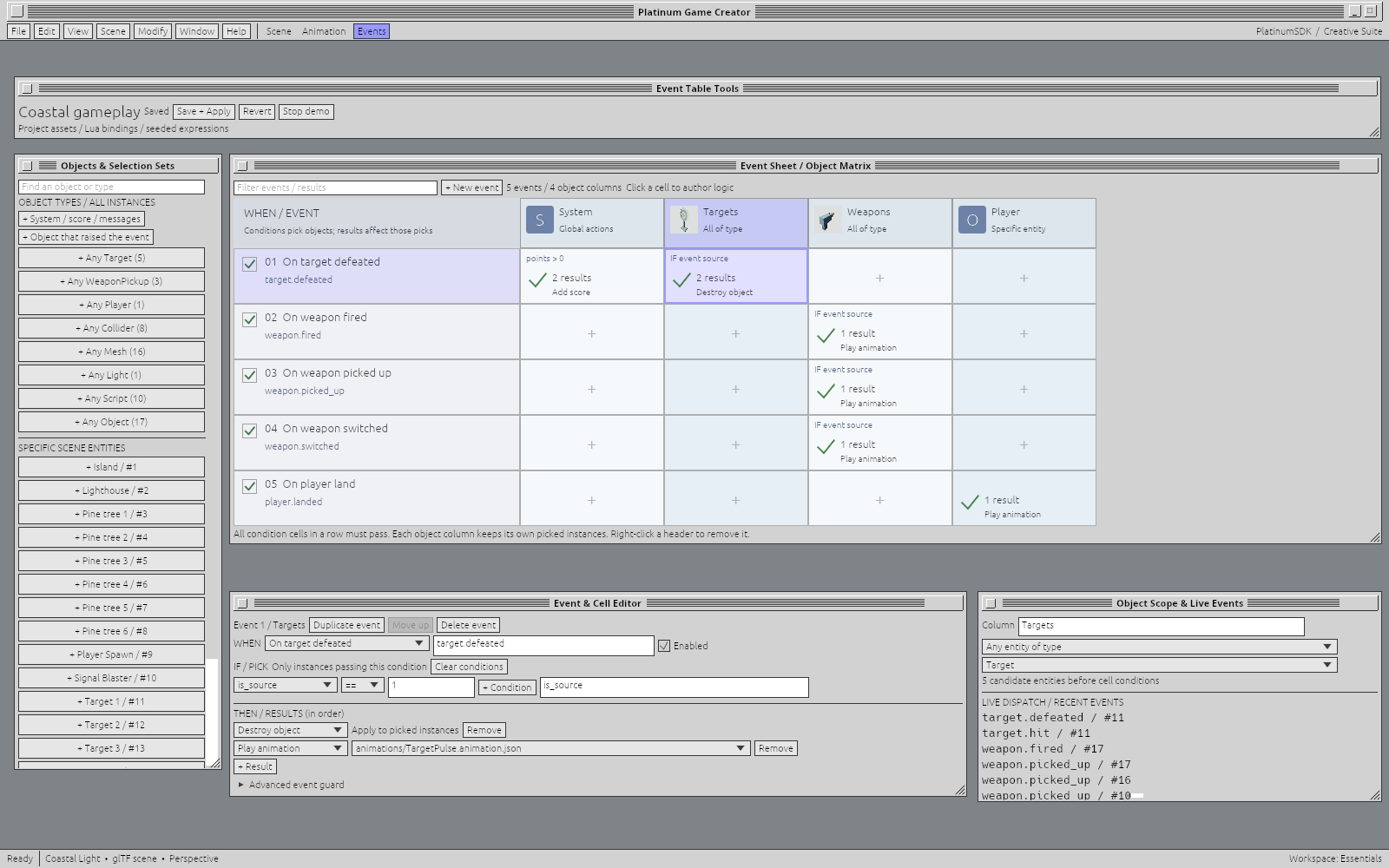
Events run down the page. Objects run across it. Conditions pick the instances you mean, and actions give them something to do. The event table makes gameplay logic visible without separating it from your scripts or scene.
The sample’s actual event table: object selection, ordered actions and live dispatched events.Open full size ↗
Choose the right objects.
Select a specific entity, every object of a type, a shared model or the source of an event. Award points globally while only the defeated target plays its animation and disappears.
Let scripts join in.
Emit a named event from Lua and handle it in the table. The same route handles weapon fire, pickups, landings and your own game-specific events.
See why it happened.
Inspect the live event monitor, read a cell’s conditions and follow its results. Save and apply changes to the running session while refining the rules.
GPU PARTICLE SIMULATION
A little spark. A whole lot of atmosphere.
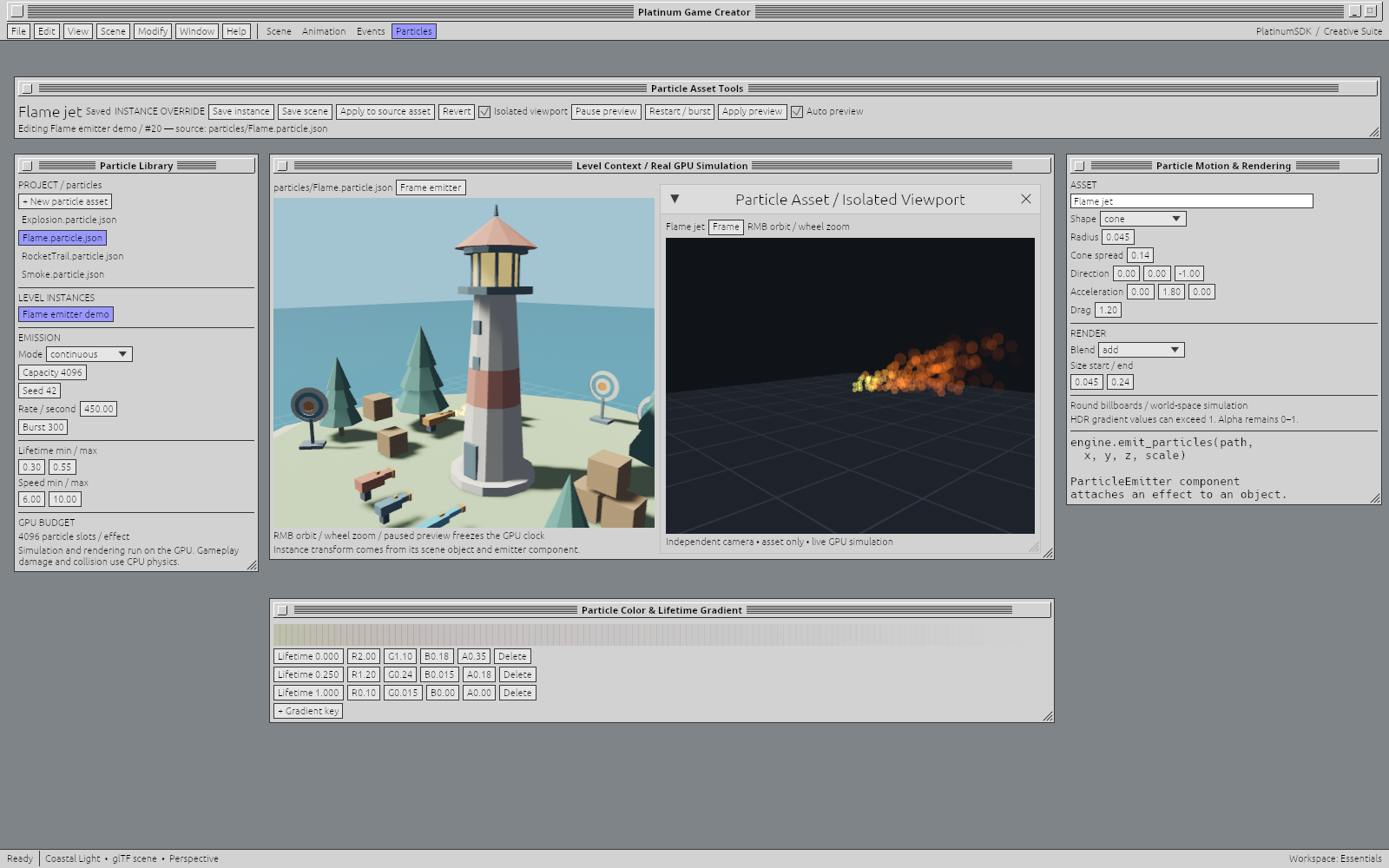
Build a flame jet, a drifting cloud of smoke or the burst that makes an impact feel right. Game Creator’s Hanabi-powered particle system simulates and renders effects on the GPU, with an editor that lets you shape the result while watching it move in your world.
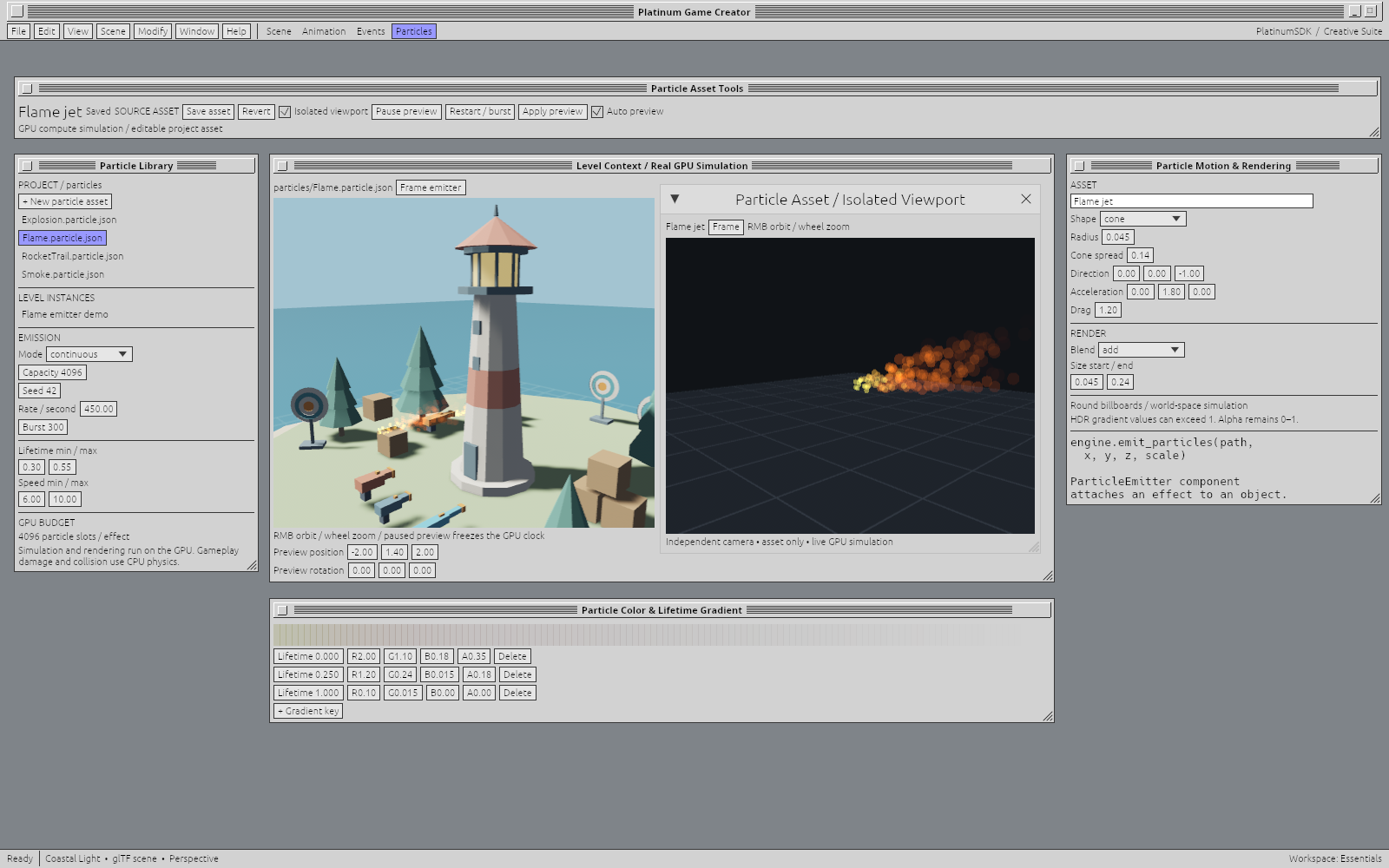
One effect, two useful views: judge the flame in the level while tuning it in an isolated floating viewport.Open full size ↗
Shape the effect.
Choose continuous emission or a burst. Tune lifetime, speed, direction, spread and radius; give particles acceleration and drag. Control how size, HDR color and transparency change over a particle’s life, with additive or alpha blending.
See the change.
Live previews update as you edit. Orbit, pan and zoom around the effect independently of the scene. Pause to inspect a moment or restart a burst, with the level and isolated view available together.
Give detail room to grow.
GPU compute handles the visual simulation, with configurable capacity up to 65,536 particles per effect. Cached effect definitions and bounded emitters keep resource use deliberate. Gameplay collision and damage stay in the physics and scripting systems.
Make this emitter its own: tune a scene instance, or explicitly apply the changes to its source asset.Open full size ↗Effects in play: the sample connects GPU particles to its weapons and the scene.Open full size ↗
Make once. Use wherever it belongs.
Save an effect in the project library, then attach it to scene objects with a ParticleEmitter component. Offset, rotate and scale the emitter without changing the object itself. Keep a local override for one instance, reset it to the source, or deliberately update the library asset for the instances that inherit it.
Let gameplay set it off.
Emit a particle asset from Lua at a position and scale, or attach an emitter to something that moves. The sample includes flame, smoke, explosion and rocket-trail assets, with particle exhaust following physical rockets and explosions connected to damage and impulses. Visual feedback and game rules work together while keeping their responsibilities clear.
PLATINUM GAME CREATOR / THE ENGINE
Easy to pick up. Room to go a long way.
A game engine for people who want to make things. Build by hand, write your own logic, or bring tools that help you work. The creative decisions belong to you.
01 / SCRIPTING · LUA 5.4
Think it through in Lua.
Lua scripting runs in the engine today: small, readable behaviors you can understand, change and build on. The sample FPS uses it for movement, jumping, weapon pickup, shooting and scoring. Keep the script beside the scene, edit it, then save and restart Play to run the changes. A Fusion-style event table offers another route into game logic, with native code support for deeper systems.
02 / YOUR WORKFLOW · COMING SOON
Human-friendly. Agent-friendly. Your choice.
The editor is being designed to be straightforward for a person at every step, and practical for off-the-shelf AI agents when you choose to use one. Readable scripts, editable project data and repeatable operations are the foundation for advanced workflows: inspect a scene, organize assets, prepare a batch of changes, or help with game logic.
There is no built-in generative AI, required assistant, or model subscription planned. Bring an external agent of your choice, or work entirely by hand. The engine should help you express your ideas, with you deciding what belongs in the project.
03 / LEVEL DESIGN · COMING SOON
Build a space. Walk around in it.
Classic constructive solid geometry (CSG) level editing brings back a direct way to shape a world. Block out rooms and corridors, combine brushes, carve openings, and refine the space as the game takes shape. Use it alongside reusable models and scenes, from an early layout to a deliberately authored level.
04 / RENDERING & PERFORMANCE
A modern engine behind a familiar desk.
The current 3D editor uses a GPU-rendered Bevy scene, glTF models, physically based materials, depth, lighting and shadows. Asset thumbnails are rendered from the same models. Selection and transforms update the scene directly, and the lighthouse beacon runs as a real-time light.
The wider rendering direction combines modern 3D presentation with scalable, data-oriented scene processing. Performance work is aimed at keeping the editor responsive as a project grows, and giving creators useful choices about visual quality and runtime cost. Advanced runtime features continue to develop alongside the engine.
05 / GAMEPLAY FRAMEWORK
A foundation for the game, not just the scene.
The built-in gameplay framework brings controllers, collision, weapons, health, pickups, scoring, respawn lifecycles and game events into a coherent component model. Lua and the event table work with the same objects, so behavior stays connected as a project grows.
The fixed-step gameplay framework runs at 120 Hz, with a shared player controller, Jolt physics and authoritative multiplayer. Local movement prediction and reconciliation keep your own character responsive; interpolation smooths remote characters and objects. Lua and Events connect authored gameplay to UI, sound and character presentation.
PUBLISH YOUR GAME
Native platforms. A place on the web, too.
Publish on Steam, itch.io, your own website or any storefront you choose. Your game belongs to you; Platinum does not tie distribution to a proprietary store. Windows exports package the game, assets and multiplayer services, and the latest native demo is available above. Standalone WebGPU builds also run in the browser: Coastal Light is the earlier single-player edition while its updated web build is prepared. The wider export toolchain targets mobile and console platforms, plus WebGL; additional targets are in development. store submission requirements apply, and console releases depend on platform approval, SDK access and certification.
A NEW PLACE TO PLAY / COMING SOON
Make a world. Find your people.
We’re building toward a platform where personal avatars, game discovery and distribution, multiplayer services and community forums live together. A place to share what you make, meet players and keep a community around a game. It is an additional home for your work, with publishing elsewhere always part of the picture.
Have a game in mind?
Contact Winnitude! to discuss evaluating Platinum Game Creator, engine licensing, platform needs, or a custom integration.
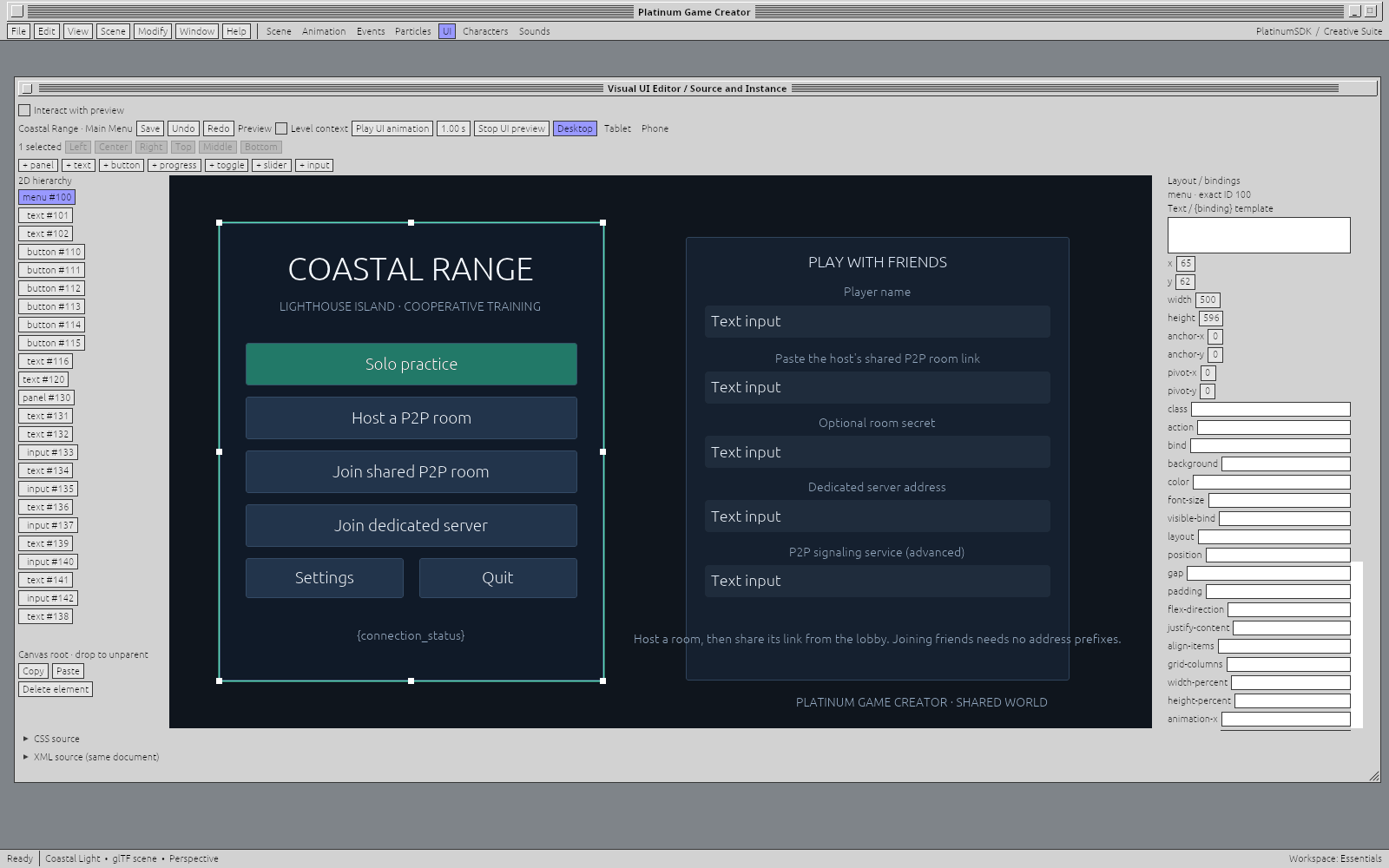
Build menus, HUDs, lobbies and settings in a visual UI editor. Arrange controls on the canvas, work in the hierarchy and keep the properties beside what you’re changing. Preview desktop, tablet and phone layouts without leaving the workspace.
The actual Coastal Range menu, authored with the same UI tools available to your project.Open full size ↗
Direct manipulation.
Move and resize controls, align selections, snap to guides and use undo or redo as you explore. Clear handles and visible properties keep the work close to the result.
Design meets behavior.
Bind values to the HUD and connect actions through Lua or Events. Keyboard and gamepad navigation, focus and modal screens belong to the runtime, too.
Visual or source.
Work on the canvas or edit the XML and supported CSS directly. Reusable templates and instance overrides let a shared interface adapt to different places in the game.
CHARACTER STUDIO / SKELETAL ANIMATION
A character. A whole vocabulary of motion.
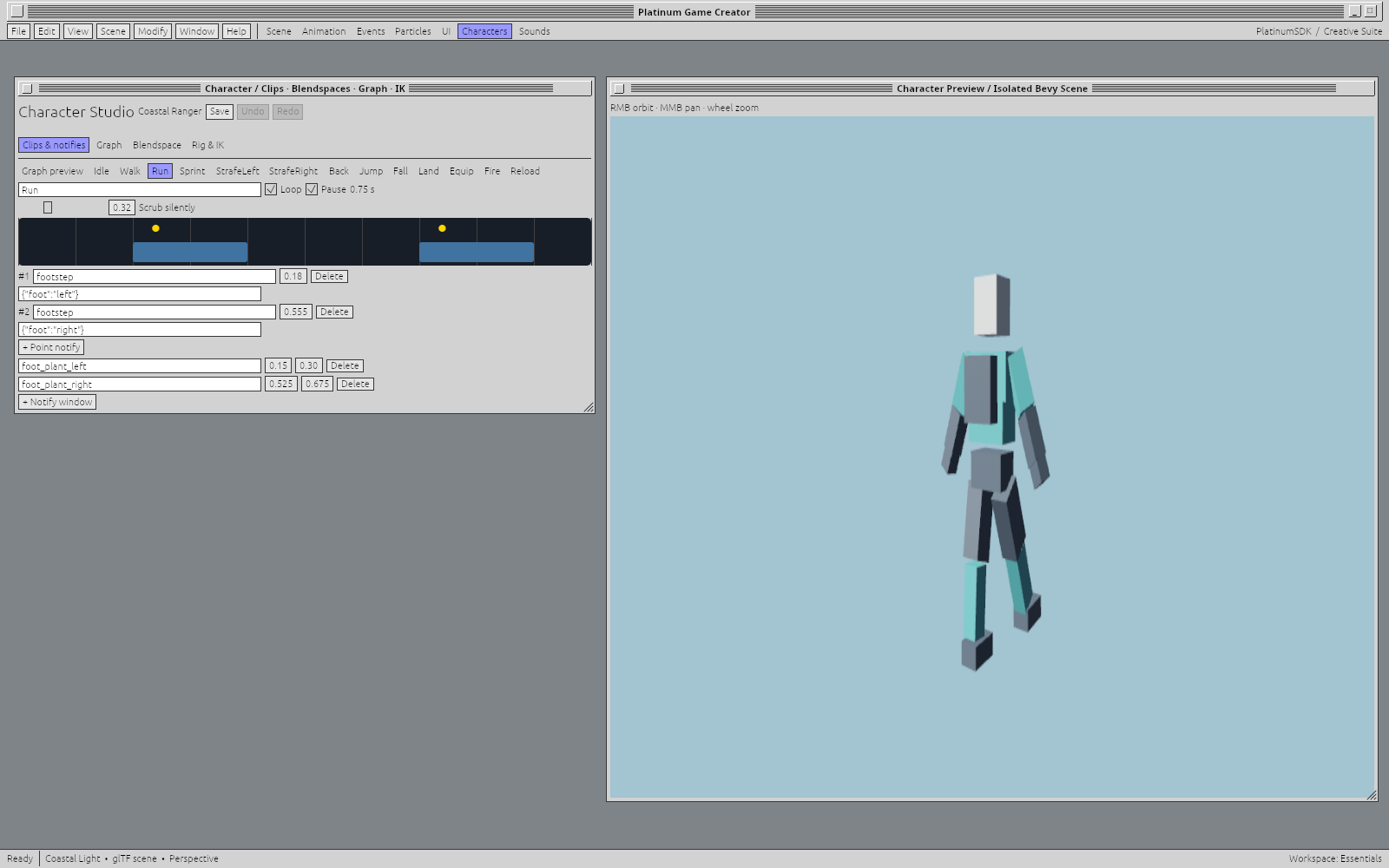
Bring skinned glTF characters into a dedicated workspace for clips, animation graphs, blendspaces and rig controls. Shape how a character moves, changes state and carries equipment, with the pose visible while you work.
Work with skeletal clips, point notifies and notify windows. Preview a motion and place the cues that connect footsteps, sound and presentation to the right moment.Open full size ↗
Lua, Events and native systems can drive the same animation parameters. Gameplay remains responsible for physics, damage and inventory; animation gives those decisions expression through motion, layers, sockets and presentation cues.
THE PROJECT LIBRARY / MORE THAN A FILE LIST
A place for every piece. Tools for what it does.
Models and textures, reusable objects and scenes, Lua scripts, event tables, UI documents, animation and sound all belong to the project. Browse folders, search and filter, switch between grids and lists, and inspect a model before placing it in the world.
Reusable objects carry useful work forward. Place models and linked prefabs in the scene, then adjust the instance for the job.Open full size ↗
Worlds & objects
Scenes, models, materials and linked prefabs. Build with reusable pieces while keeping instance-specific choices.
Behavior & movement
Lua, Events, object animation and character profiles. Author logic and motion as assets you can find and edit.
Interface & sound
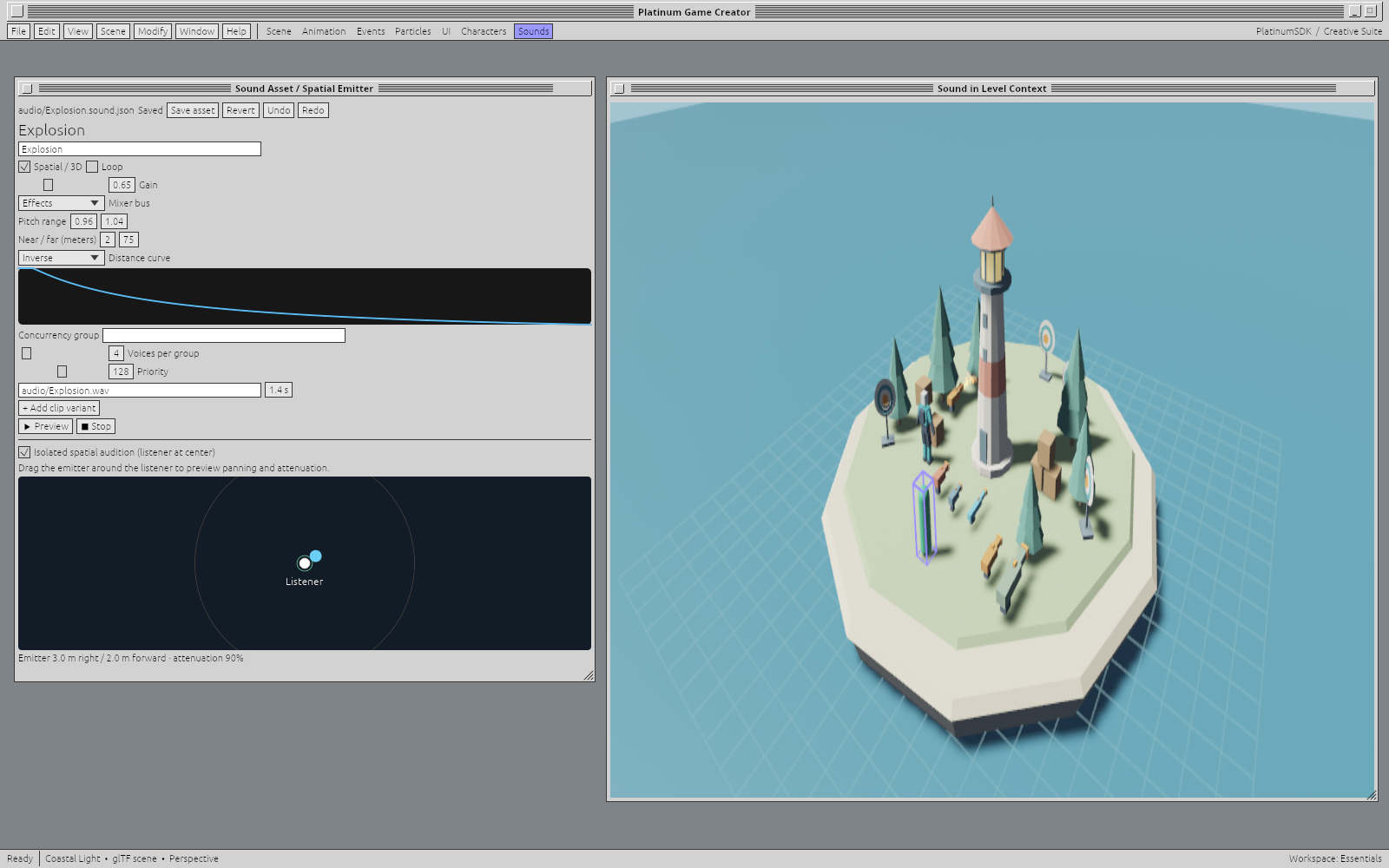
Menus, HUDs and spatial audio. Give UI and audio the same deliberate authoring attention as the world.
Audition a sound in isolation or tune an emitter in context, with buses, distance attenuation and voice limits close at hand.Open full size ↗
MULTIPLAYER / BUILT INTO THE FRAMEWORK
The same world. More people in it.
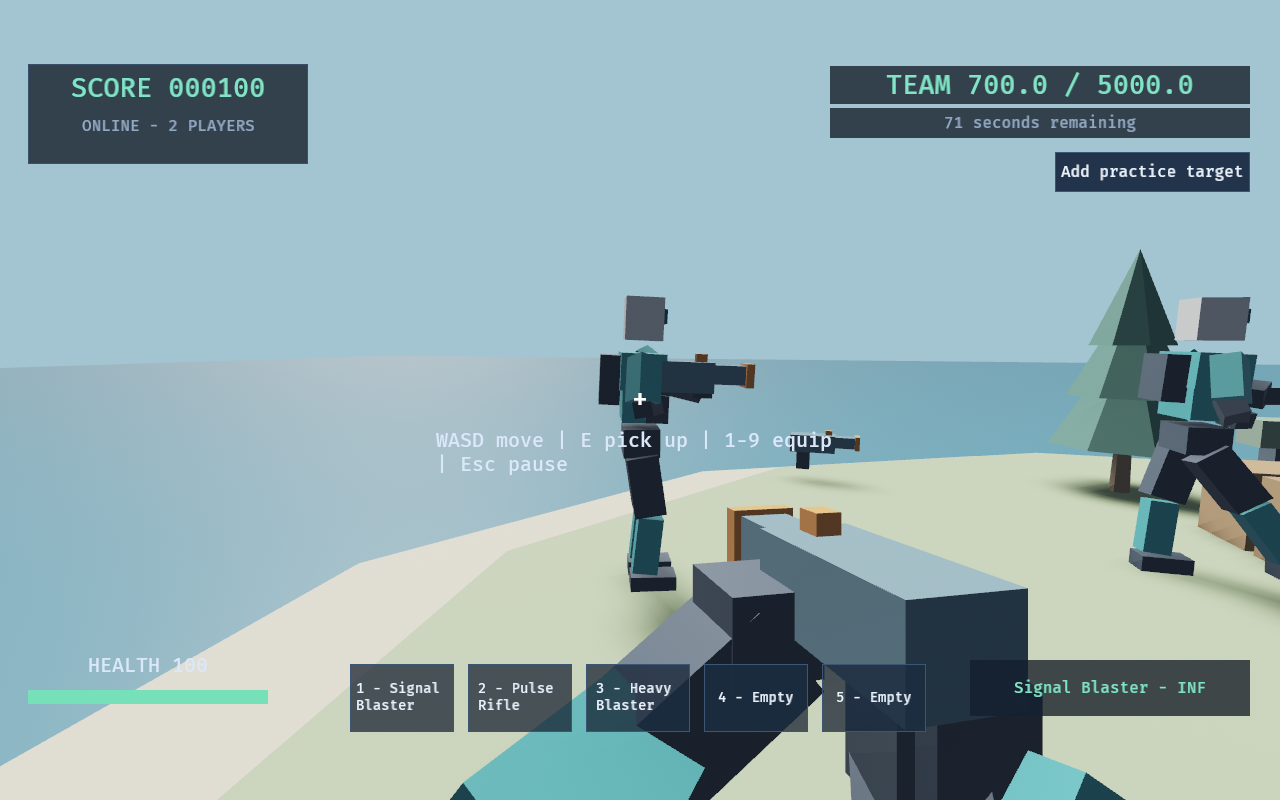
Bring players into a shared game with authoritative gameplay, local movement prediction, reconciliation and interpolated remote motion. Player ownership, inventory, scoring and level transitions belong to the framework, so your project can concentrate on what makes the game yours.
Two real native clients in the same local game, connected through QUIC and WebSocket. The capture uses an extended round goal to keep the action visible.Open full size ↗
Authority where it matters.
The server owns damage, pickups, projectiles and the shared world. Local movement responds immediately, then reconciles with the authority. Bounded hitscan rewind helps evaluate shots against recent target positions.
A transport for the session.
Dedicated or listen-server play uses QUIC/WebTransport with a WebSocket fallback. Optional WebRTC host-authority rooms offer another way to bring players together.
Presentation stays smooth.
Remote characters and moving objects interpolate between snapshots. Sound and animation cues accompany the action while the simulation keeps its own fixed-step rules.
The current Windows download includes the standalone player and assets; dedicated authority and signaling tools are part of the engine evaluation workflow. Local native multiplayer has been exercised with mixed transports. The updated browser build and browser-to-native play are being prepared; the browser demo above remains the earlier single-player edition.
THE SAMPLE PROJECT / LIGHTHOUSE RANGE
A small FPS. The whole creative loop.
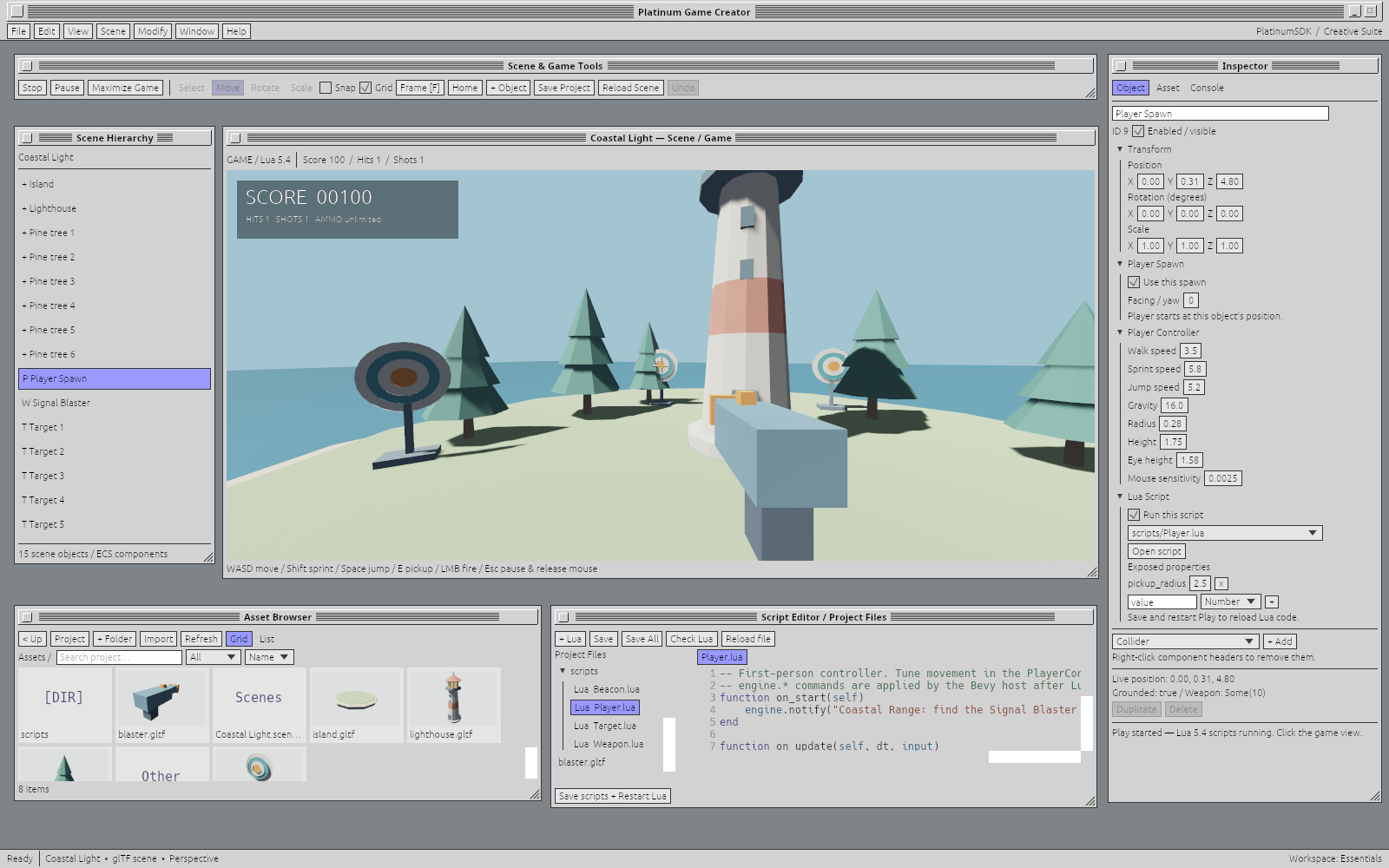
Walk out onto the island, pick up a blaster and try the range. Lighthouse Range connects an authored 3D scene, readable Lua, editable components, event-table rules and procedural animation in one playable project you can take apart and make your own.
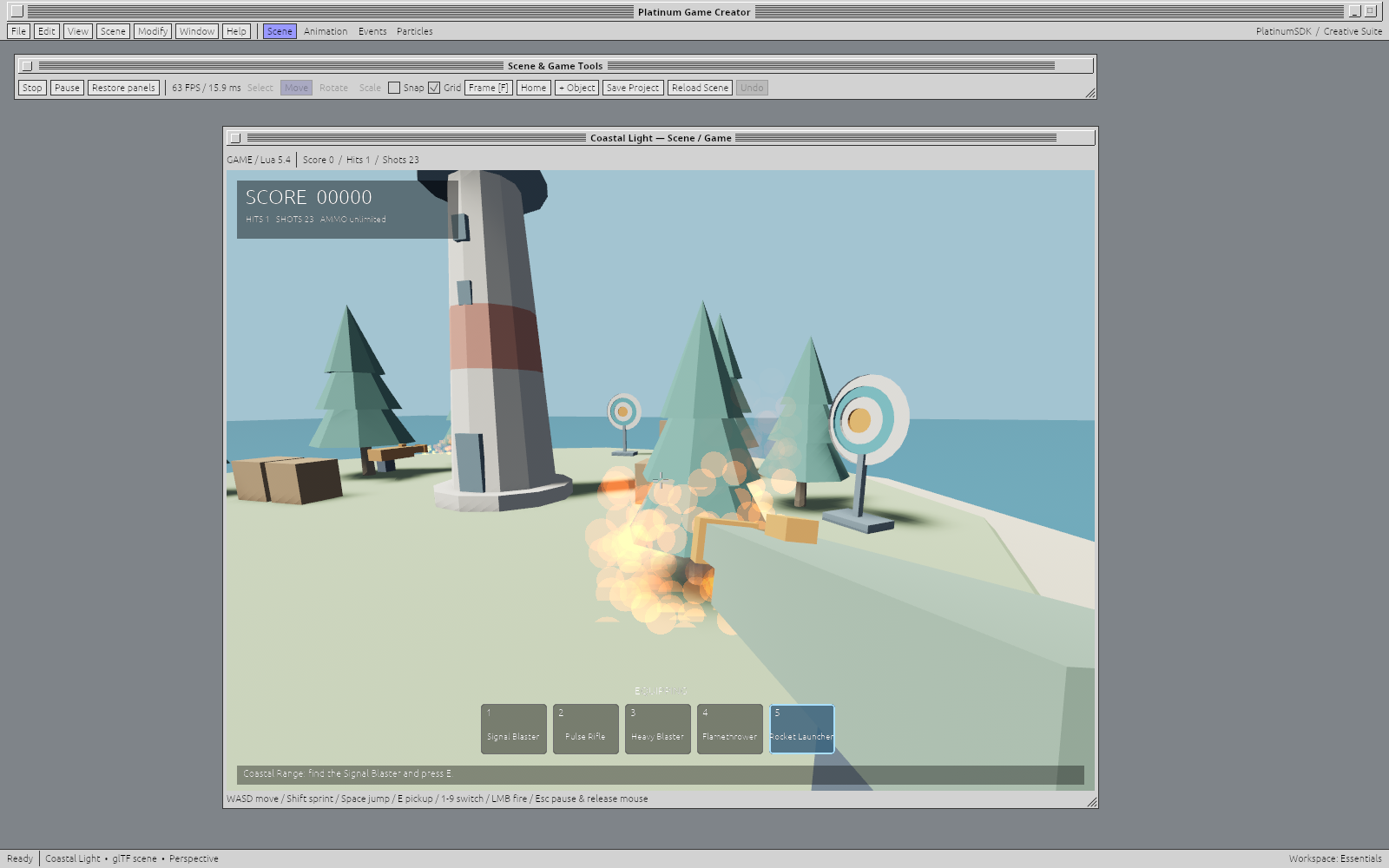
First-person play inside the editor, with score, a weapon, scene components and Lua close at hand.Open full size ↗
Move. Explore. Experiment.
Walk, sprint and jump around the island. Scene colliders give the lighthouse and trees a physical presence; falling into the sea returns you to the authored spawn.
Three weapons. Your rules.
Find the Signal Blaster, Pulse Rifle and Heavy Blaster, then switch between acquired weapons. Damage, range and cooldown live in editable components. Targets award points and respawn for another round.
Change something. Play again.
Adjust a controller, rewrite a Lua behavior or change a scoring rule. Save, restart Play and feel the difference. Stop returns the editor to the authored scene.
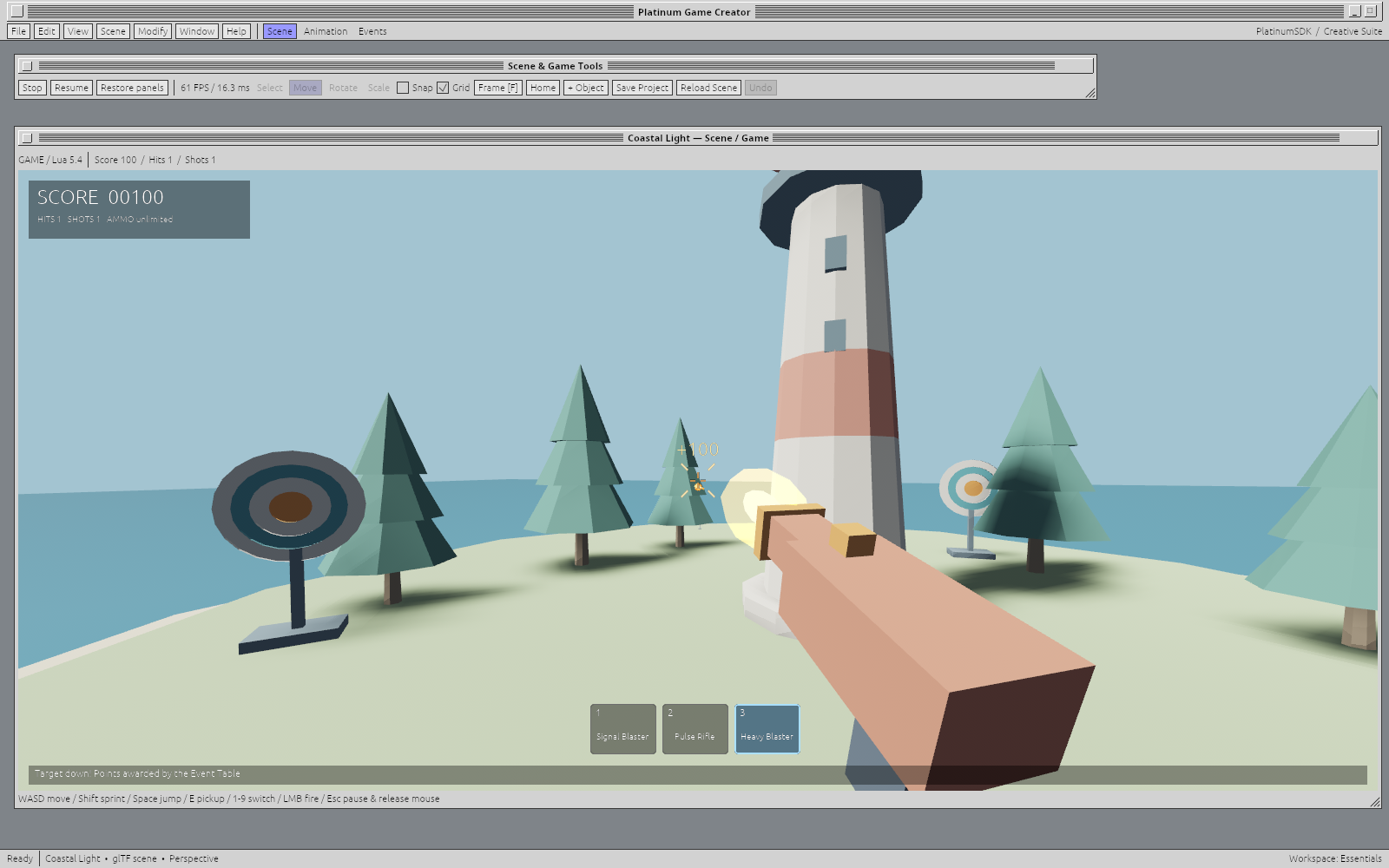
A scored Heavy Blaster shot: muzzle flash, recoil, hit feedback and the three-weapon hotbar.Open full size ↗
Responsive feedback has a budget. The sample reuses effect resources and bounds particles, tracers and impacts, keeping temporary effects from accumulating as you play. View-motion controls let you tone down camera movement.
FIRST-CLASS PROCEDURAL ANIMATION
Give movement a mind of its own.
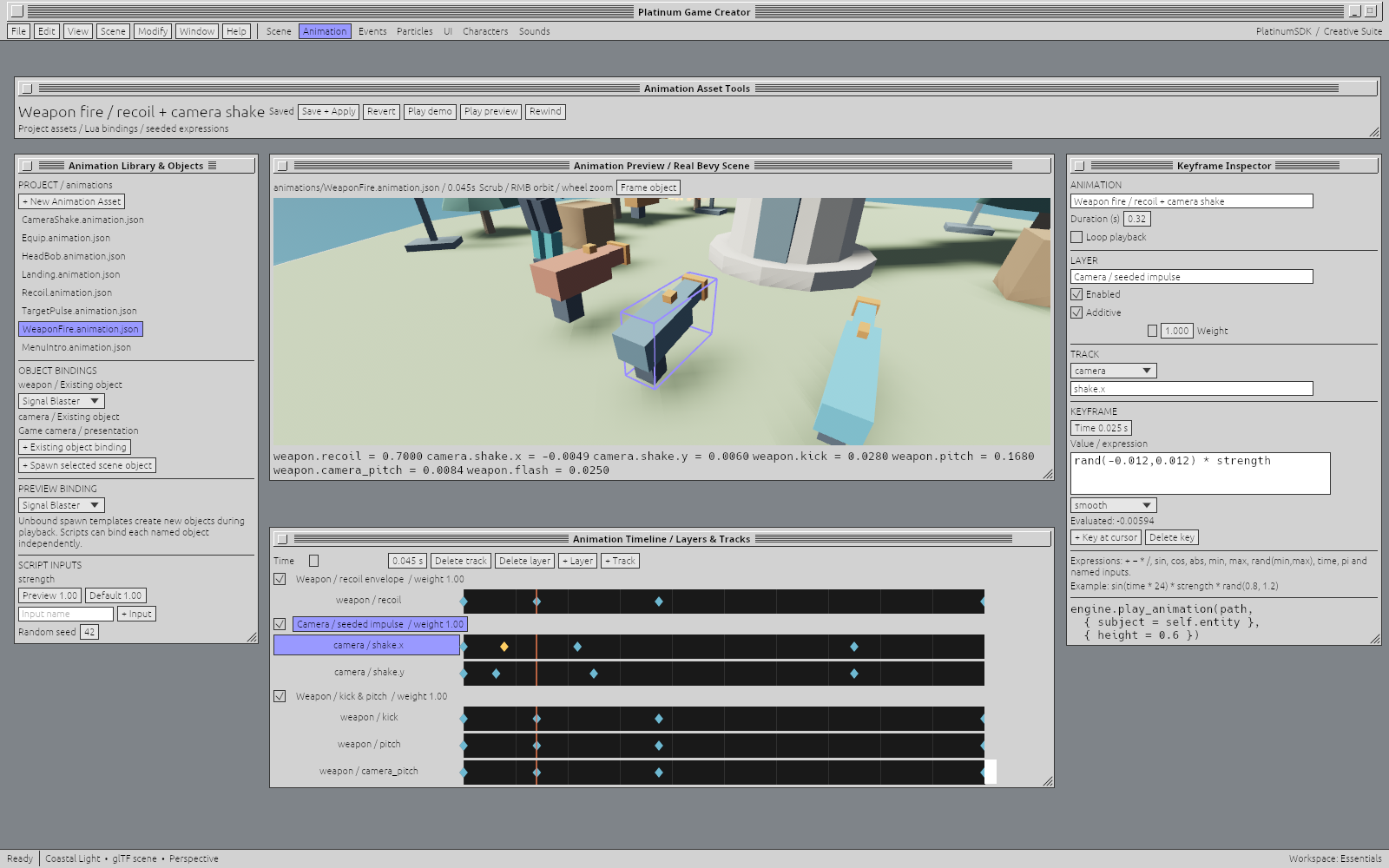
Animation is an editable project asset, with a timeline, named object bindings, layers and expression-driven tracks. Shape a motion by hand, then let gameplay supply its strength, timing or variation. Recoil, head bob, landing, equipping and target pulses use this system in the sample.
WeaponFire: layered recoil, kick and seeded camera shake, previewed against real scene objects.Open full size ↗
A timeline you can touch.
Scrub, preview and drag keys. Combine weighted and additive layers, with linear, smooth or stepped interpolation across transform and presentation channels.
Motion that responds.
Named inputs and small expressions adapt a clip to the moment. Seeded randomness adds repeatable variation. Preview the inputs, then supply them from Lua or an event-table action.
Reusable behavior.
Bind a clip to existing objects or let it create temporary scene objects. Save and apply updates to the running presentation library, so useful motion becomes part of your project’s vocabulary.
THE CREATIVE SUITE / WORKING TOGETHER
One bird. More than one way to make it fly.
Build a game with characters you can open in Animator, and scenes you can bring into Video Editor. The tools should understand the work they share.
A Little Lift / shared project library
Assets
Artwork, materials, animation and audio that belong to the project.
Objects
Bird.object carries the character; Bird.flight carries its animation.
Scenes
Meadow.scene brings the objects together. A composition can use the same scene.
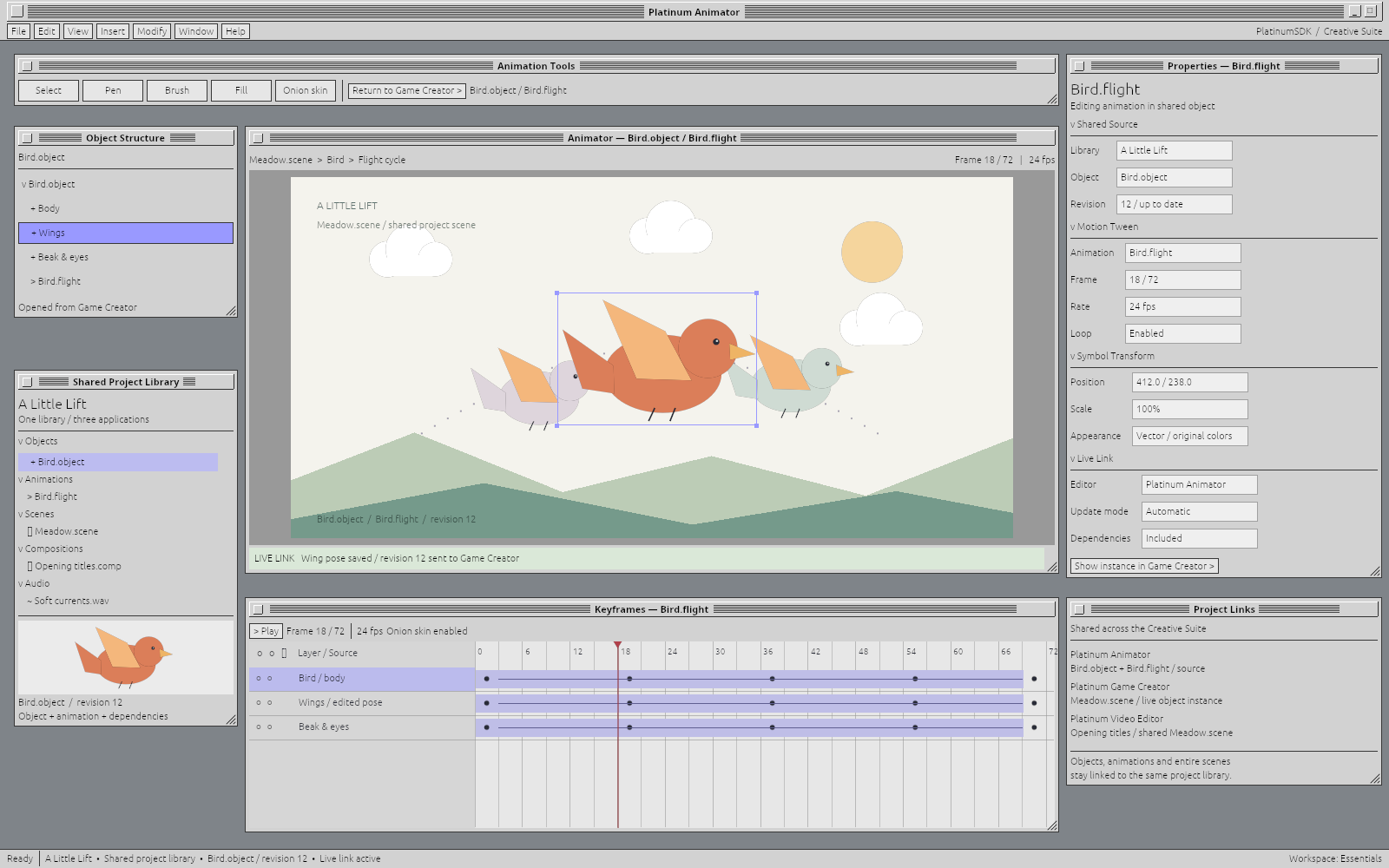
1. Work on the source in Animator
The bird’s flight cycle is open on the timeline. Objects, animations, scenes, compositions and audio sit in the same project library.
Open image to inspect at full size ↗
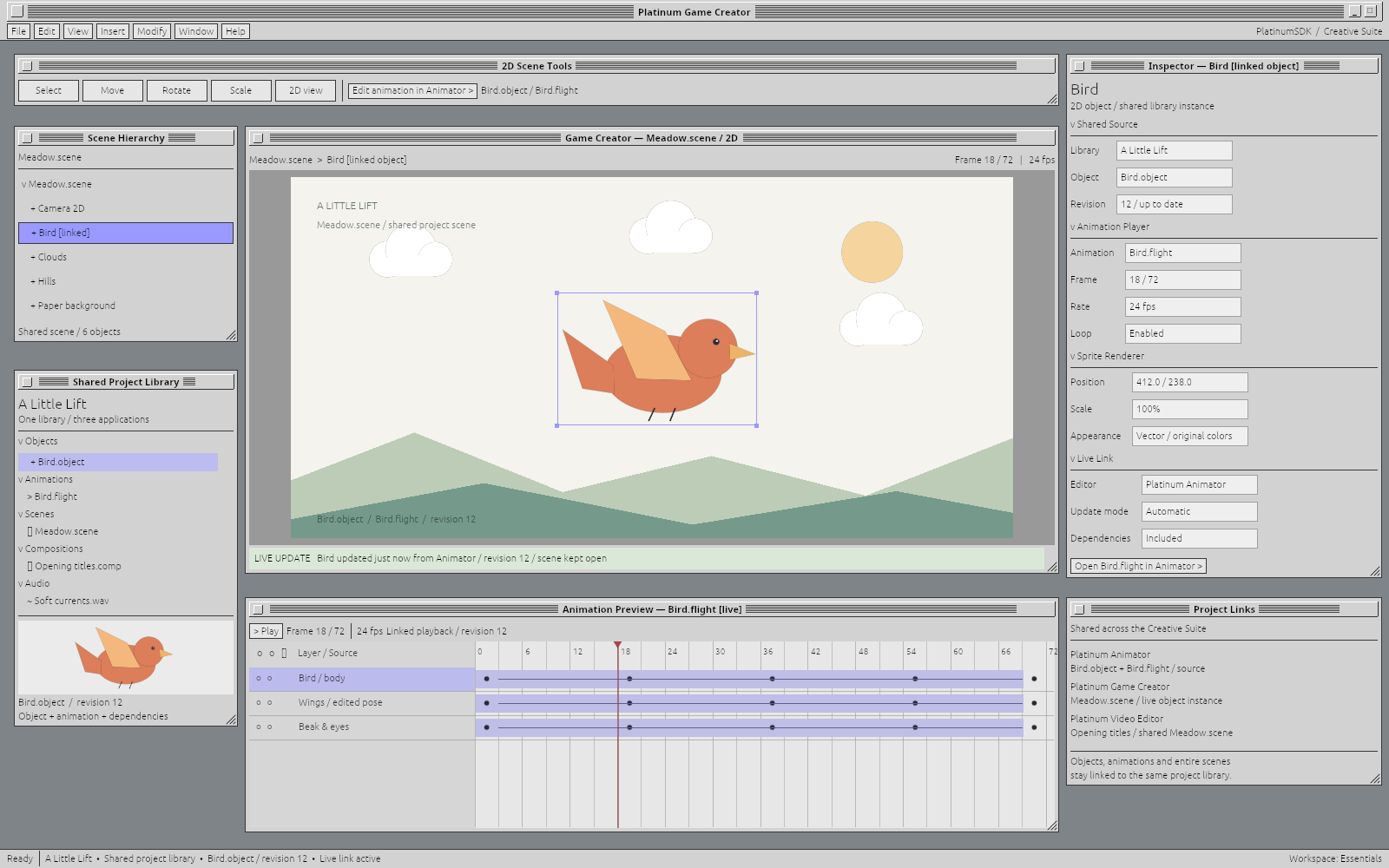
2. See the same object in Game Creator
The matching bird, pose and revision appear in the scene. Edit animation in Animator leads back to the source; the project links also connect the scene to Video Editor.
Open image to inspect at full size ↗
Keep the object. Change the view.
The ambition goes beyond sharing an exported image. Asset libraries, reusable objects and entire scenes can keep their identity as you move between applications. Live views would let you work on the source in one tool and see the result in another, without a trail of disconnected copies.
Coming soon: shared project libraries and live updates across the creative suite.
PART OF THE PLATINUM FAMILY
A familiar feel. A modern foundation.
These tools are built around PlatinumSDK, and your own applications can be too. Reuse document editors, controls, commands and workspaces, or bring your own application model. The direction is a compatible family of tools that can cooperate around shared work. Cross-platform support remains central; availability varies by application and release.