PlatinumSDK Runtime manual
What the Runtime is trying to give back
A fast computer should let you think about your work. PlatinumSDK takes the immediacy of older desktop software seriously: a small control should not need to become an entire dashboard, a document should remain visible when you leave it, and changing a setting should not interrupt every other task.
The framework combines those human-interface ideas with modern rendering, shared services, declarative UI, Lua, typed events, managed data, asynchronous work and capability-scoped operations. Applications can share useful infrastructure instead of rebuilding a separate copy of every service. Optional modules keep a form-only application from deliberately requesting a game's physics or other unrelated facilities.
This is a design goal, not a measurement that every Platinum program is faster than every older or competing program. Costs depend on rendering, assets, providers and the application itself. Native modules, a large scene or a slow server can still stall work if integrated badly. The engineering performance ledger distinguishes actual measurements from estimates. The user-facing result we seek is simple: inputs respond, background work has a visible status, and a failed application does not take the desktop's flow with it.
Windows and workspaces
A toolbox is a thing with a purpose. A formatting palette, scene inspector, asset browser or timeline can have its own window, rather than consuming permanent space around every document. The main window is the work: the page, conversation, image, scene or other object you want to see. When you look away, the tools step aside.
Native applications can use independent operating-system windows. A traditional docked layout puts the same tools into one surrounding frame. Contained layouts keep their subwindows inside one host view. These are presentation choices; they do not change the application's permissions. Browser applications follow browser/canvas constraints and cannot promise the same native desktop window behavior.
The classic title strip puts Close on the left, with Minimize and Maximize/Restore on the right where the host supports them. Drag the title strip to move a native window, and its edge/corner to resize. Platform shells, accessibility modes and app-specific hosts can adapt the appearance.
A floating toolbox offers Dock, and a docked toolbox offers Float. Application-owned tools can use the new Pin/Unpin control:
| Tool/window | While this application is active | When another application is active |
|---|---|---|
| Main/document window | Visible unless explicitly minimized/closed | Remains visible |
| Ordinary floating tool | Visible when enabled | Hidden |
| Pinned floating tool | Visible when enabled | Remains visible |
| Docked tool | Part of its document's layout | Follows that document's window |
Focusing a pinned tool brings the application's other enabled floating tools back. Pinning does not make a window always-on-top, grant permissions, prevent closing, or keep tools alive after their owner is closed. Disabled tools stay disabled. App-defined auxiliary windows must adopt the SDK policy before they gain this behavior; the new control covers registered SDK panels. Pin preferences are saved when the application persists its panel layout.
The result is a workspace you can arrange around your own habits. Multiple visible main views let you compare work without several walls of controls competing for attention. The tools return when needed, preserving a sense of place. Your software can make itself at home without taking over the room.
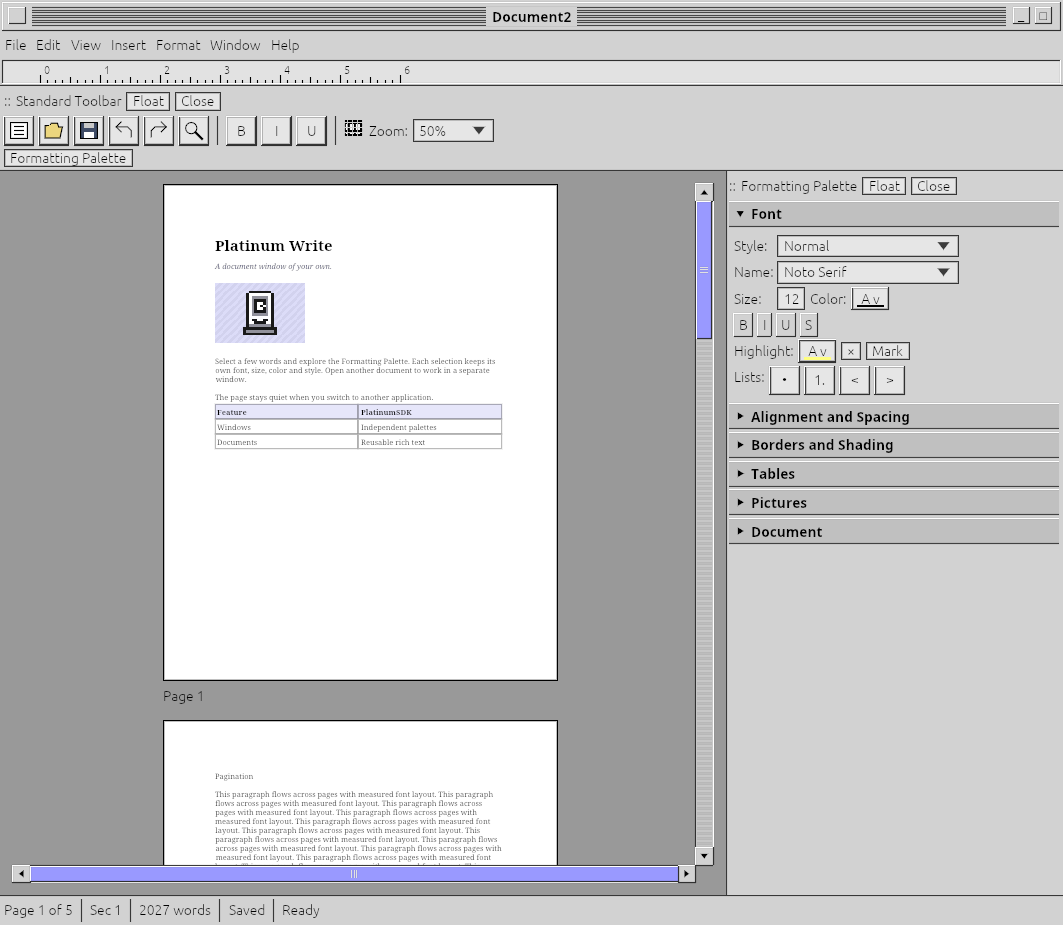
Historical real application capture, inspected for this manuscript. It illustrates docking and the main page; it predates the new Pin control and is not release acceptance evidence.
Applications and trust
A PLA is a Platinum application package. It carries the app's declared runtime data—such as scripts, UI, assets, manifests and referenced modules—under a compatible host's package/admission rules. A package can be launched against a compatible prebuilt Runtime without every user compiling an executable. Exact packaging and protection depend on the build and installed providers.
An EXE/native application is operating-system executable code. It can host the SDK or load a native extension, but its use of Platinum widgets does not restrict everything it can do through the OS. A PLA containing native modules also brings native code into its effective trust boundary. A file extension alone cannot establish safety.
Package integrity means expected bytes match a manifest or signed release. Publisher authentication means a trusted key/authority binds those bytes to a publisher. Licensing means an entitlement allows the relevant use. Permissions mean the current actor can perform a particular operation. These are separate questions. A genuine, licensed app can contain a vulnerability or intentionally harmful behavior. An unsigned hobby app can be useful and benign, but you have less independently verifiable evidence about its origin.
Before running unfamiliar software, examine its publisher, exact build, requested capabilities and verification status. Historical “this build was verified” information does not establish that it has no current revocation, an active subscription, or permission to access a particular document. Locally exported development packages may provide integrity only; they must not be displayed as production publisher verification.
The full practical model, opt-outs and limitations are in Security.
Settings and configuration
Runtime-wide choices establish defaults or limits for applications. Per-application choices identify one installed application's stable GUID; renaming its window does not create a new security identity. App-specific document preferences belong to that application. A project build manifest and a user's runtime settings are different kinds of configuration.
The following table describes the settings model. Availability depends on the installed host; the current branch adds a reusable settings editor and validated APIs, not a completed globally authoritative settings daemon. Follow before releasing screenshots or exact navigation instructions.
| Setting | Meaning and practical consequence |
|---|---|
| Online services | Controls automatic service requests. All-online opt-out must cover discovery, retry, background checks and optional reporting—not merely hide an account button. |
| Exact one-shot Verify/Download | Allows only the specific consented request in an otherwise offline session; does not switch all services on. Requires the installed coordinator/provider. |
| License/build verification | Chooses current online knowledge, authentic retained/imported offline information, or explicitly trusted unverified use where permitted. Does not create an entitlement. |
| Changed-file integrity: Off / Middle / Highest | Off omits monitoring; Middle detects deviations using signed baselines; Highest additionally supports provider-backed verified recovery. Details below. |
| Check frequency | Interval for verification decisions; host scheduler must execute the checks. New-session checks are separate. |
| Cloud verification | Enables Hub confirmation of changed-file hashes. Disable for local-only signed baselines and reduced independence from the host. |
| Force Encryption on All Tunnels | A system floor that prevents an application's requested plaintext optimization. |
| Application tunnel policy | Can require encryption, allow a deliberately unencrypted connection, or refuse encrypted connections; both peers must agree and system restrictions still apply. |
| Theme default / application preference | Selects the ordinary inherited or app-specific theme. |
| Force system theme / exclusions | Applies a system choice except to selected apps, subject to the application's explicit supported-theme policy. |
| Recovery / Live behavior | App- or resource-specific controls; disabling automatic sharing does not retroactively erase data already disclosed. |
A host should show effective settings as well as requested settings. A disabled provider must appear unavailable, never as a green “protected” indicator. Changing a draft in the new editor produces an Apply request; persistence and policy activation need a successful host result. Cancel leaves accepted settings unchanged. Never hand-edit a signed configuration to silence a mismatch: use the trusted settings path so a legitimate new revision can be recorded.
The current typed security model defaults to Middle, a one-hour check interval, cloud verification enabled, and forced encryption. These are library defaults, not proof that your installation has an online Hub, installed scheduler or active tunnel adapter. Invalid intervals, unsupported values and malformed settings reject rather than silently weakening policy.
Theme changes affect appearance, not authorization. An application's code-level refusal of user themes remains respected by the existing resolver. Advanced overrides can break presentation; their warning/acknowledgment belongs to the trusted host. Do not copy warning-ack flags into ordinary app data as though they were credentials.
Files, documents and recovery
Platinum Files remembers how folders are arranged: view, sorting, geometry and item positions. Reopening a folder should feel like returning to a place. Folder windows can be linked by moving their title edges together, then separated with Alt-drag or Separate Window. See the complete Files manual for selection, drag, copy, preview and platform details.
Files' .Platinum Trash is separate from the operating system's Recycle Bin. Put Away uses its origin record; Empty Trash is permanent. A session undo history is not a durable filesystem journal. A failed cross-volume copy/move can leave partial output; inspect the reported destination before retrying.
Keep these states distinct:
| State | What you can rely on |
|---|---|
| Local draft / preview | The current view contains your tentative change. |
| Pending validation / commit | Work has been submitted; it may fail, conflict or have an uncertain outcome. |
| Accepted authoritative revision | The responsible service accepted the operation. Durability depends on its provider. |
| Saved file | The file-writing workflow acknowledged that particular snapshot. Later edits may remain unsaved. |
| Recoverable checkpoint | The registered state covered by that provider can be restored under its stated guarantees. |
| Backup | An independently retained copy with its own retention and restore policy. |
Recovery coverage differs by application and state domain. A scene file does not capture an entire running game. Document body recovery does not automatically promise every undo item, caret, palette position or native resource. Review the application's recovery status rather than assuming all memory is persistent.
Working across devices and services
A Live Object can be local, owned by another process or hosted remotely. A uniform interface makes it easier to compose work; it cannot make remote latency disappear. The app should show pending work, disconnection, read-only access and resynchronization. Reconnecting must not apply an edit to a different resource generation merely because its path looks the same.
Keep identity, ownership and permissions separate. Signing in through PlatinumAuth does not grant Hub staff authority or another person's private records. Buying an application does not grant it access to all documents. A collaboration invitation should disclose its resource and rights. Stop sharing or revoke the grant through the authority that owns it; closing your view alone may not remove other participants.
Troubleshooting
| Symptom | What to check |
|---|---|
| Floating tools vanished | Refocus any window of the app; check View/Window, pin and docking state. |
| Tool remains visible after switching away | Check Pin or an app-requested force-visible mode. Pin is not always-on-top. |
| Offline app cannot complete Verify or sign-in | The action needs a configured service/provider; retained offline information may be available but cannot supply new server knowledge. |
| Tunnel connection refused | Both endpoint policies, system force encryption, adapter compatibility and authenticated transport status. No silent downgrade. |
| Integrity mismatch | Preserve the affected file, identify a legitimate change, and verify the baseline/key/Hub receipt. Do not automatically replace it with the suspicious current bytes. |
| Reinstall warning after an ordinary update | Check install GUID continuity, restored settings and machine identity. It is a warning to investigate, not proof of attack. |
| Changes visible in one view but not another | Verify they target the same Live Object, projection, revision and authority; a copy or transient Play view is independent. |
| Export says compilation required | Native code or host compatibility changed. A data-only export cannot rebuild a native module. |
| Recovery reopened less than expected | Check declared state coverage, last acknowledged revision and whether the provider was durable. |
When reporting a fault, include app/runtime versions, platform, exact error and whether work was pending, accepted or saved. Redact credentials, keys and private documents. Do not include a private key or passphrase in a support report.