PlatinumSDK | GUI Manual
Choose the right layer
Most application behavior should use declarative UI plus Lua and Event Tables. UI data describes objects, layout and bindings; the host validates it, creates a view and dispatches permitted actions. This makes ordinary forms and toolboxes easier to rearrange without rebuilding a native executable.
There are two related but not interchangeable implementations today. platinum_core::ui_document is the bounded, renderer-free authored-document model with layout/edit transactions, available with ui-documents. platinum_sdk::game::ui contains Game Creator's existing renderer, XML assets and engine.ui Lua bridge. It still has a legacy document model. The framework is converging on shared infrastructure; do not assume parsing a core document automatically instantiates a native window or that game Lua globals exist in every host.
The generated GUI API, widget reference and Lua API provide source-derived lookup. The module guide covers office controls, authoring tools and native panels that sit outside the eleven XML element kinds.
Visual authoring
Game Creator's UI workspace lets you select a hierarchy object, arrange its rectangle, change fields, inspect XML/CSS and preview Desktop/Tablet/Phone layouts. Select Interact with preview when you want controls to act instead of selecting them for editing. Save the authored UI asset before exporting the project. A selected instance can carry overrides without silently modifying every source instance.
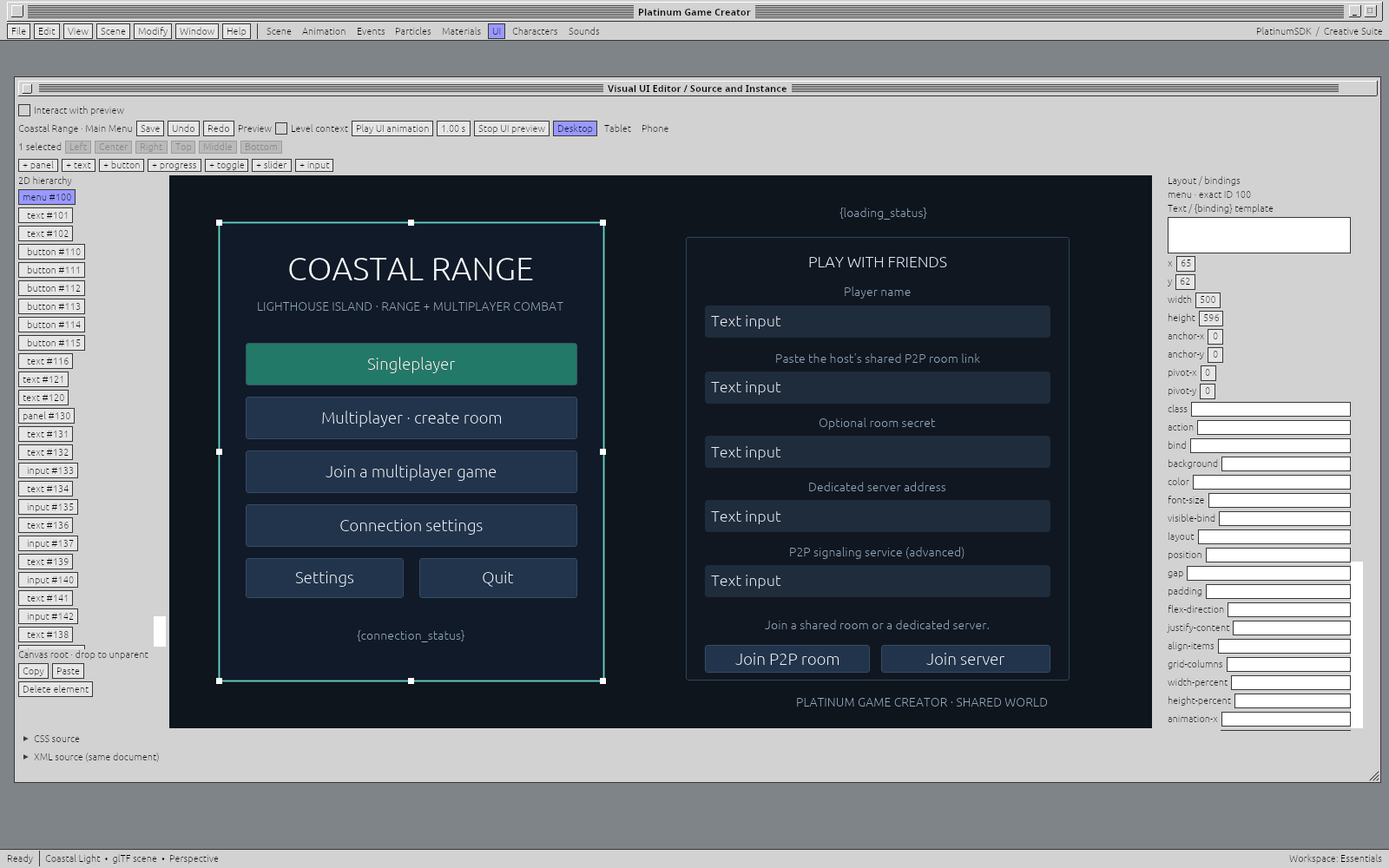
Historical real capture, visually inspected. The hierarchy, canvas and Layout/bindings fields are visible. It is not evidence of the new Runtime settings editor or complete release widget acceptance.
Rendered per-widget screenshots are a required part of the final atlas. They must come from a matching tested renderer build; the image ledger records the current capture gap. The examples below describe data and behavior, rather than substituting mock drawings for screenshots.
A first UI data file
Save this as an authorized project asset such as UI/greeting.ui.xml:
<ui version="1" name="Greeting" width="640" height="360">
  <panel id="1" x="24" y="24" width="592" height="312">
    <text id="2" x="16" y="16" width="520" height="32">Hello, Platinum</text>
    <input id="3" x="16" y="64" width="360" height="40" bind="user_name"/>
    <button id="4" x="16" y="120" width="200" height="40" action="greet">Greet</button>
    <text id="5" x="16" y="176" width="520" height="32">{status}</text>
  </panel>
</ui>
Every element has a unique exact unsigned 64-bit id. Nested elements identify their parent through the XML tree. Keep IDs stable across edits; they are binding targets, not permission handles. Do not pass large IDs through lossy floating-point conversions in a script or JSON bridge.
x/y are local geometry coordinates; width/height describe the rectangle. The model's ordinary number fallback is x/y 0, width 200, height 40. Validated documents reject invalid dimensions/identity structure. A class selects styling rules where supported. action names intent, while bind connects a value by name; neither gives an untrusted UI permission to execute a privileged native call.
Supported layout includes authored rectangles and the implemented flex/grid/anchor-related fields; see bundled XML examples and the generated reference for exact per-host support. The stylesheet is a bounded SDK subset, not arbitrary browser CSS or JavaScript. Importing a file must not execute scripts merely to measure layout.
Built-in data-driven elements
Common fields include id, geometry, class, text, and supported visibility/style bindings. Only set fields a renderer documents; the model may preserve additional inert attributes without interpreting them. See the atlas reference for extracted real examples and the actual runtime property handling.
| Kind | Purpose / principal inputs | Output and events |
|---|---|---|
panel | Groups children; rectangle, layout, padding/gap and style where supported. | Container/layout; no inherent domain action. |
menu | Groups a menu/screen hierarchy using the host's UI conventions. | Child actions; not automatic OS menu installation. |
text | A label or bound text template such as {status}; color/font sizing where supported. | Presentation; ordinary text is not executable markup. |
button | Caption, action, geometry and enabled/visible/style state. | Activation is exposed as ui.clicked; owning action still needs authorization. |
image | Authorized asset reference and rectangle/style. | Rendered image; loading/decoding and unsupported resources can fail. |
progress | Bound progress/value and visual styling. | Readout; does not itself complete a task. |
toggle | Bound boolean/value and caption/state. | Changes feed ui.value_changed; host controls accepted application state. |
slider | Bound finite value and implemented range/step fields. | Changed value through ui.value_changed; validate in domain code too. |
input | Bound text/value, geometry and supported editing options. | Edited value through ui.value_changed; secrets need a trusted input path. |
scroll | Bounded viewport around children. | Scrolling/view state; it does not grant access to hidden resources. |
list | Repeated/list-like presentation using the host's supported binding/layout. | Child selection/actions where implemented; no universal automatic database query. |
The Game UI event names above are source-backed. Do not infer that every possible pointer/IME/focus event exists as a public Event Table binding for every kind. Value changes, click intent, accepted domain state and durable save are separate events.
An example of an independently configured button:
<button id="20" x="16" y="16" width="160" height="40"
        class="primary" action="save_document">Save</button>
This declares a Save intent; it does not implement saving. Connect that action through the host's registered command route, then display success only after the proper file/authority acknowledgment.
Lua: manipulate the existing Game UI
Inside a Game Creator host that registers engine.ui and has access to the asset:
engine.ui.open("UI/greeting.ui.xml", true)
engine.ui.set_value("status", "Ready")
engine.ui.set_value("user_name", "Ada")

-- Patches are validated/queued by the host. Inspect the resulting state later.
engine.ui.patch("UI/greeting.ui.xml", "4", { text = "Say hello" })
local caption = engine.ui.get("UI/greeting.ui.xml", "4", "text")
-- engine.ui.close() closes through the current UI command route.
The exact-ID binding accepts the bridge's exact identity representation; the example uses a decimal string to avoid numeric precision loss. A queued patch need not be observable synchronously in the same callback. Bind greet through your host's Event Table/action dispatcher; that dispatcher should read user_name, perform the registered operation and publish status. Do not invent a universal on_click global. The Lua reference links actual commands, queries and available event counterparts.
Rust: edit a UI document
This core-only example parses the bounded DSL and performs a validated local edit. It does not launch a renderer:
use platinum_core::ui_document::{UiDocument, UiHistory, UiTransaction};

fn change_caption(xml: &str) -> Result<UiDocument, String> {
    let mut document = UiDocument::parse(xml)?;
    let mut history = UiHistory::default();
    let mut edit = UiTransaction::begin(&document)?;
    edit.edit(|draft| {
        let button = draft.elements.iter_mut()
            .find(|element| element.id == 4)
            .ok_or("Button 4 is absent")?;
        button.text = "Say hello".into();
        Ok(())
    })?;
    edit.commit(&mut document, &mut history)?;
    Ok(document)
}
Enable the core ui-documents feature. Use parse_with_limits for smaller application budgets. Deserializing a public serde structure is not validation: bound incoming bytes and call the proper validator before layout/use. UI transactions preserve the original state on failed validation and reject a commit if the canonical document changed in the meantime. Collaborative undo needs an operation-aware policy beyond replacing a local snapshot.
A native renderer/module can accept this validated document and return a typed view/action channel. That frontend-thread/process bridge and generated typed widget struct are not implemented uniformly in this checkout. Use the existing host adapter, stable widget IDs and registered actions; do not forge a cross-process pointer or assume a generated constructor exists. This remains a release coverage gap.
Toolboxes, documents and authoring controls
The XML kinds are not the whole SDK. Office controls include menus, buttons, check/radio controls, fields, palettes, tables, pictures and paginated documents. Editor controls add formatting, find/replace and rich text. Authoring provides hierarchy, inspector, timeline and transactional gestures. The reusable node editor supports node/port/link composition; game-specific materials and animation provide their domain behavior.
A registered panel supplies its stable ID, title, size/dock preference and draw/action callbacks. The SDK owns its native/canvas surface lifecycle; the app owns its contents and command authority. Use the window manual for Dock/Float and Pin. A panel is not a separate application principal merely because it has a separate window.
Native extension tutorial and intended workflow
Native Rust should be considered when you must add or extend a core system unavailable through Lua—for example a new decoder, domain operation, platform service or renderer adapter. Ordinary forms, behavior and game rules should stay in Lua/Event Tables and declared UI when those APIs cover them. Native code increases build/deployment complexity and the process's trusted code.
Start with a narrow domain function, expose typed bounded inputs/results through the host's command/service registry, and bind that operation to the UI action. Keep IO/heavy work off the GUI lane. Authorize again in the owning service; an untrusted frontend's save_document string is not evidence of user consent or access.
For a currently supported native document host, the minimal integration is:
use platinum_sdk::{office, workspace::{DocumentWorkspacePlugin, WorkspaceConfig}};

fn main() {
    let config = WorkspaceConfig::new("my-notebook", "My Notebook");
    let mut app = office::application(&config.title);
    app.add_plugins(DocumentWorkspacePlugin(config)).run();
}
This uses public workspace APIs to get document lifecycle/recovery; it is not a complete native-module ABI/loader tutorial. The native module specification describes the planned artifact/role boundary and its current gates. Keep unsupported loader/code-generation behavior labelled as such.
Live views, safety and accessibility
The intended LiveView behavior is described in Live Objects. Existing XML bind values are not cross-app resource grants. The new core live / live-mode / live-projection / live-copy-destination options are parsed into typed requests for the common schema/JSON LiveView adapter. Hosts supply actual source/destination capabilities, cancellation, read-only state and revision status. See the Live Objects chapter for working Lua/copy examples and the separate accepted-world summary bridge; older widgets need explicit adoption.
Labels, keyboard traversal, focus, disabled state, reduced motion, high contrast, IME and screen-reader acceptance matter as much as geometry. The presence of a UI element in the source inventory is not proof of complete accessibility or touch support on every platform. Test the actual host and target; do not label a scene's convenient preview as an accepted application workflow.